Command Center by RaZerLaser
The last software your maker shop will ever need
The most advanced software for consumer lasers, printers, CNC, and more
Free for everyone
The last software your maker shop will ever need
We are testing it now. Sign-up and downloads open here when it's ready.
- 84
- coming soon
- No licence fee, no subscription
- Optional credits for cloud extras, from 10¢ down to 7.7¢ each
- Your machines keep working with no internet
Watch
The tour: every tab, chapter by chapter
Read the transcript
- Command Center. This is Command Center, by RaZerLaser. It's the last software your maker shop will ever need. One app runs the business side, your laser and your UV printer. It's free for everyone, and it runs on your own computer, so your machines keep working without the internet.
- Business. The Business tab starts with the marketplace: blanks, patch material and supplies from wholesale suppliers. Supplier catalogs sync on their own, so stock and prices are always current. When a job needs blanks, the cart fills itself from the order. You just click approve. No more wasted time ordering supplies and blanks. Campaigns find you new customers. It automatically finds their logo, creates the patches, places them on the apparel, creates a brochure with all your pricing and discounts, and sends it with a personalized message. Customers can view their showroom, request changes, or buy right away. You see when prospects open the email and view their showroom, so you can follow up with a phone call to close the sale. The logos and patches builder turns any logo into a patch, using only the materials you stock. Effects draws forty looks, like leather and embroidery, for free, and sends them straight to a gang sheet. Gang sheets pack paid jobs tight, with the print and cut files made for you. Every order becomes a job, with clear stages all the way to shipped. On the shop floor, the production station shows what's next, in big type. The website builder makes you a real shop website. Already on Shopify? Bring your shop over in a few clicks. Shoppers design their own product in your customizer and pay by card, and each order arrives as a job. My Store connects your Shopify store, and adds catalog products to it in one click. Social autopilot turns your photos into posts, queued for your OK. The bookkeeper matches receipts to your statements, and payroll works out every deduction. Staff get their own logins, and one account can run several businesses. And suppliers get a vendor portal, to list products and ship orders.
- Laser. The Laser tab is Burn Engine, our own laser software. Arrange and Nest packs your parts in one click. The material library keeps proven settings for every material and thickness. It drives CO2 lasers, and GRBL diode lasers too. Gang patches turns a stack of patch files into one packed sheet to cut. Jobs wait in a queue, and every job keeps its history. The Production tab picks up the laser files from your order folder. The head camera scans the bed, so you place designs right on the material. Print and Cut finds the marks on a sheet of UV-printed patches, and lines the cut up with every patch. Guided calibration measures the machine and corrects it. Machine health scores every part, and tells you when maintenance is due. Turn on inspect every job, and the camera photographs and grades each one. For tumblers, the wizard scans the cup or uses a template, keeps the cup's own logo clear, and places your design. It even finds the rotary and the cup with its cameras. Camera fire watch is opt-in. If it thinks it sees a flame, the laser turns off and the head moves home. Once you've checked, “False alarm: resume” carries on from exactly where it stopped. Camera fire watch is an extra aid only. It is not a fire detection or suppression system, and it can miss a fire. Never leave the laser unattended. Pair your phone to watch the machine, and press STOP from anywhere in the shop. Jig engraving lines up a whole jig of blanks with the camera. 3D relief engraving burns real depth from a depth map or a model. Oversized jobs pass through the machine, one section at a time. And the accuracy pack tunes the machine to five hundredths of a millimetre. Fiber and galvo laser markers, on LMC controller boards, are coming soon.
- Print. The Print tab is 3D UV. The patch builder raises a logo off a Rawhide and Black sheet, in its own colour, with the black core on the cut edge. Laser-engraved patches show in 3D too, right down to the black core. In your shop's customizer, the patch sits on a 3D cap, pressed onto its curve: laser-engraved leatherette, or a raised UV print. 3D UV costing prices every patch by ink, material, machine time and overhead. Patches sit on 3D caps, and you can add 3D models of your own products. The Print Engine app runs on your own computer. It turns a photo or a logo into a 3D relief, for free. The flat print RIP lays out the bed, and shows ink, cost and time before you print. Colour calibration is per material, and raised print, gloss and textures work on flat prints. It does DTF, stickers, tiled prints and cups, and prints cut lines for the laser. Jobs land in an inbox or a hot folder, with customer proofs and a production log.
- Everywhere. Credits pay for the optional cloud extras, and you see the price before anything runs. And Command Center runs on your Windows computer, and on your Android phone.
- Pricing. Command Center is free for everyone. There's no licence fee and no subscription. Credit packs start at $10 for 100 credits, and bigger packs bring it down to 7.7 cents.
- Safety. You accept the terms every 30 days, and you're responsible for running your machines safely. Never leave a machine running unattended. That's Command Center, free for everyone, with CNC coming next. See every feature and its status on the Command Center page.
The story
One app runs the whole shop
A maker shop today juggles a laser program, a printer program, a CNC program, a website, a spreadsheet for quotes and a shoebox of receipts. Command Center puts all of it in one app: the business side, the laser, the printer and the CNC, with automation to follow later.
- BusinessOrders, quotes, customers, your store and the books.
- LaserDesign, line up and burn, with STOP on every screen.
- PrintFull-colour 3D UV printing. In testing.
- CNCRIP Engine: models to toolpaths, quotes and programs. In testing.
- CobotRobot arms and a hat alignment stand. Later.
The engines
One app, every machine
Each kind of machine gets its own engine on your shop PC, and Command Center talks to all of them. Every engine is free, like the rest of it.
- Burn EngineRuns your lasers: status, the cameras, the job queue, Send to laser from any PC, and STOP.Coming soon
- Print EngineUV, full-colour 3D UV and DTF printing: the RIP, the patch builder, and your printer's status and STOP.Coming soon
- RIP EngineFrom a model to toolpaths, a price and a program for your CNC machines.Coming soon
- 3DPrint EngineEvery filament 3D printer in your shop, from one to a whole print farm: live status, cameras, the print queue and STOP.Coming soon
- Stitch EngineOpen stitch files, digitize artwork and lettering, and see it sewn in 2D and 3D on a cap or fabric before it goes to your machine.Coming soon
- CobotSmall robot arms that load and unload repeat jobs. Planned for later.Coming soon
The showroom
Walk through the RaZerLaser showroom
Our flagship showroom in VR: every engine's machines on turntables, the launch stage, and Max at the door. On a Meta Quest you're in it; in any other browser you walk it in 3D.
On your computer
It runs on your own PC
Your machines are driven from your own computer, never from the cloud, so they keep working when the internet doesn't. The cloud is used only when it has to be: your account, credits, orders and your store. Heavy work stays in the background so the screens and the machine stay smooth.
The price
Free for everyone
The software is free: no licence fee, no subscription, no trial that runs out. You pay only for optional extras: credits for features that run on paid cloud services, supplies, and apparel orders. See every price.
Real screens
What it looks like today
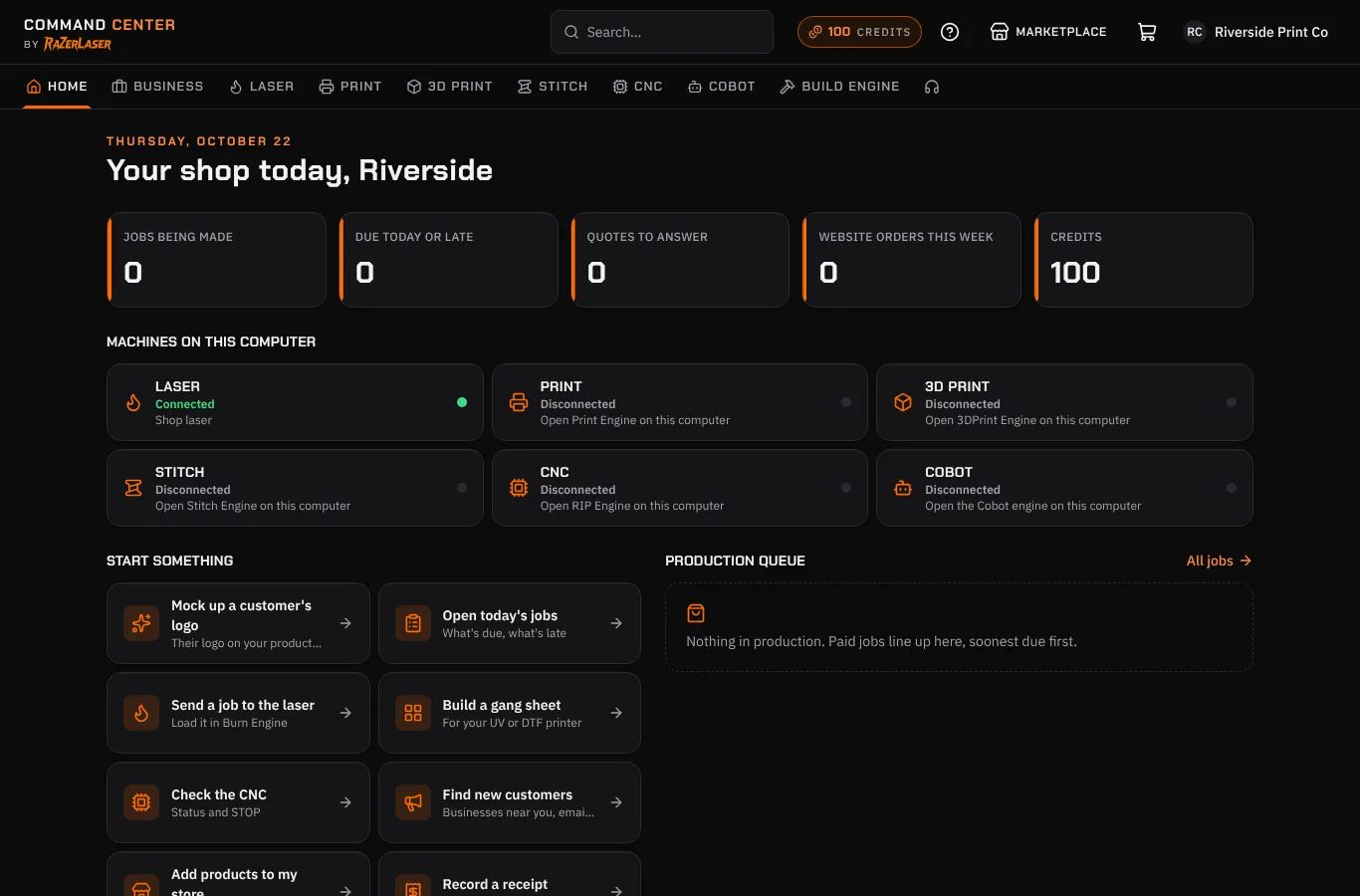
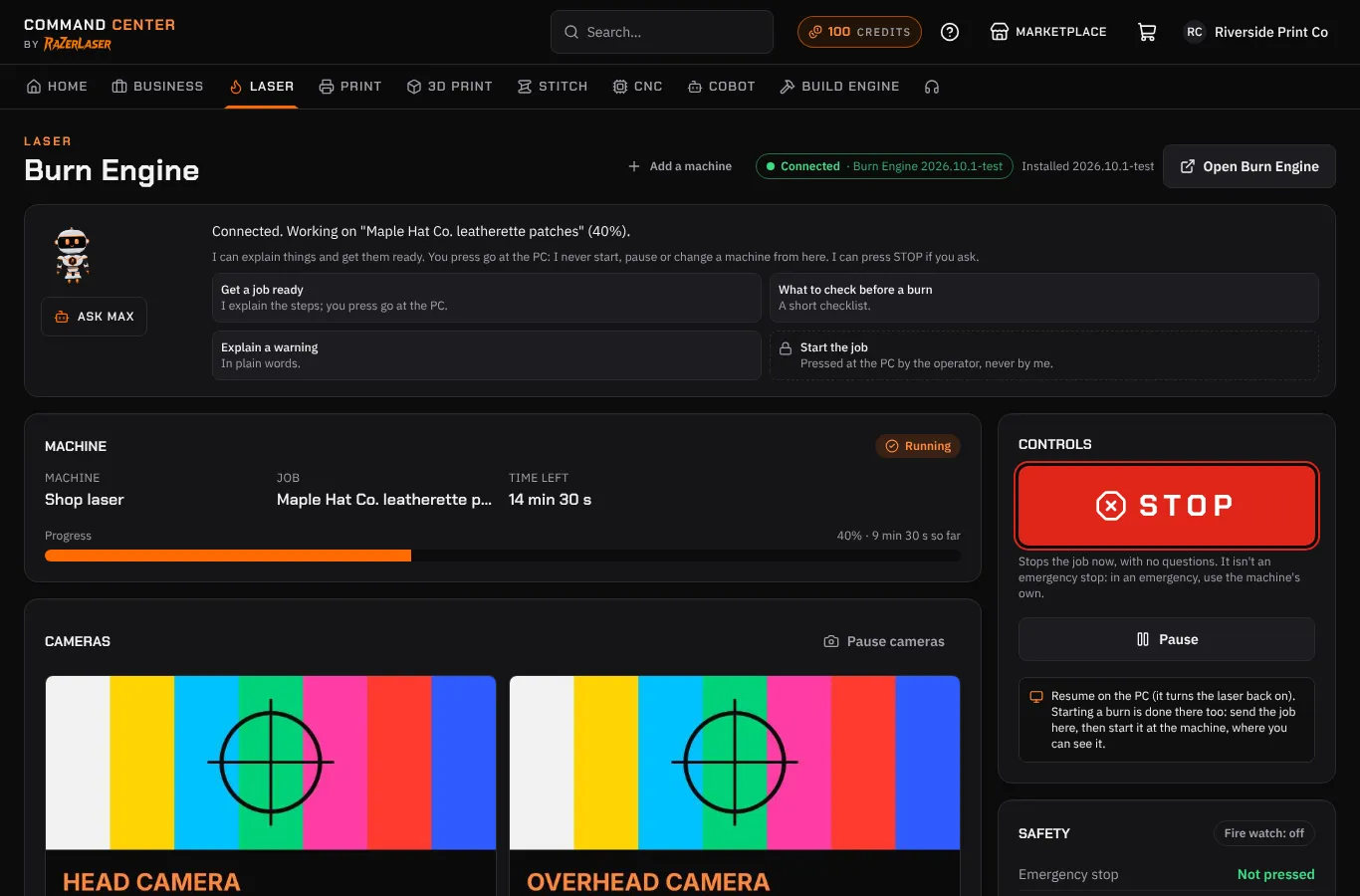
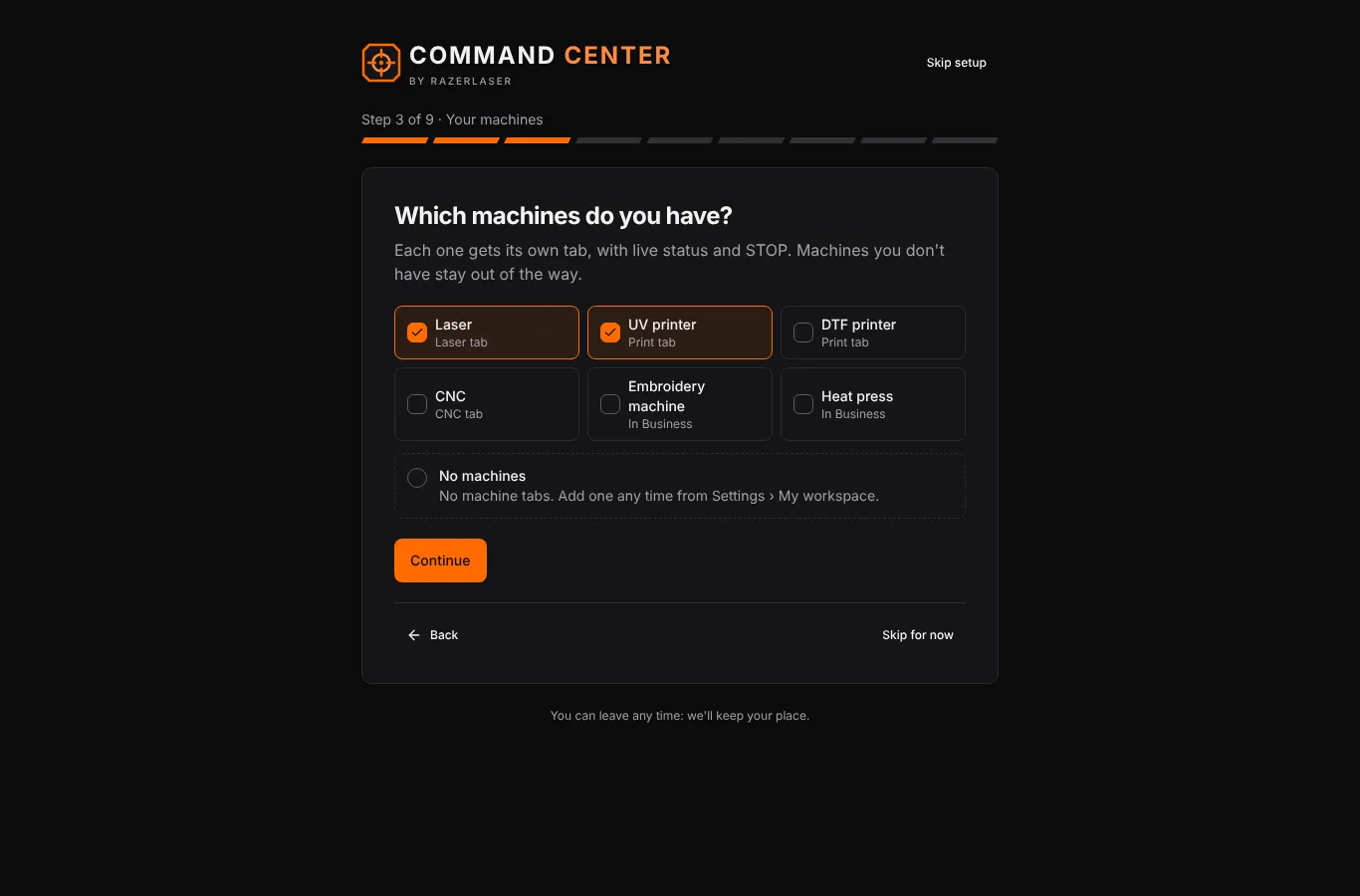
Safety
You stay in charge of the machine
- Every job that fires, cuts or moves is approved by the person at the machine. A phone or browser can watch, queue and STOP, never start.
- STOP works from every screen, with no questions asked.
- Never leave a laser or any other machine running unattended, and follow your machine maker's instructions.
Honesty
Risks and challenges
Real machines are all different
The laser features have been checked on one desktop CO2 laser so far. Other machines, controllers and cameras may need changes before they work well. Features marked "In testing" are waiting for exactly that.
Print and CNC are in testing, Cobot isn't built yet
The Print and CNC engines are built and being checked on real machines; the Cobot tab is planned, not finished. We won't call any of them available until they are, and they may arrive later than we hope.
Safety features are aids, not guarantees
No software feature replaces you watching the machine and following its maker's instructions. We say this on every screen that matters.
Some extras depend on outside services
Cloud AI and some processing rely on other companies' services. If one changes its price or stops, that extra's credit price may change, or it may pause until we find another way.
The features
The most advanced software for consumer lasers, printers, CNC, and more
Every feature shows where it really is today. A label moves only when the work behind it is done.
- Coming soon Planned. Not available yet.
Business tab · Command Center
Run the business side
Everything between a customer's first email and the paid invoice, in the same app as your machines.
Marketplace
Coming soonBlanks, patch material and supplies from wholesale suppliers in one place, or sell your own products to other shops.
Supplier catalog sync
Coming soonSupplier catalogs, stock and prices sync on their own, so what you order is what's on the shelf.
Cart and orders
Coming soonWhen a job needs blanks and supplies, the cart fills itself from the order. You check it and approve, and every order is tracked until it arrives.
Campaigns
Coming soonFinds local businesses, finds their logo, makes their patches, puts them on your apparel, builds a brochure with your prices and discounts, and sends it with a personal message. You see who opened it.
Prospect showroom
Coming soonEach prospect gets a page of their own logo on your products. They can ask for changes or buy right away, and you see when they look.
Logos and patches builder
Coming soonPick a customer, clean up their logo, then build the patch: shape, border, material, laser engraving or UV print, and the files and mockups.
My materials
Coming soonThe patch materials your shop stocks. The builder, your website's customizer and your brochures only offer those.
Effects
Coming soonForty looks such as leather, embroidery and metal, in every builder (patches, DTF, stickers, sublimation), drawn exactly and for free on your computer.
Effects on gang sheets
Coming soonPut an effect on any design on a gang sheet; the sheet's print files carry it.
Jobs
Coming soonEvery order becomes a job with a stage and a due date, from new to shipped.
Quotes
Coming soonCustomers ask for a quote with their logo; you price it, send a proof and turn it into a job.
Gang sheets
Coming soonPack paid jobs tight onto sheets for your laser, UV or DTF printer, with the print and cut files made for you.
Production station
Coming soonA big-type order screen for the shop floor, and a calibrated projector with crosshairs that shows where a print or patch goes on a hat or shirt in the press.
Website builder
Coming soonA real shop website with your products, pages and checkout. AI can write the whole store for you.
Bring your shop over
Coming soonAlready selling on Shopify? Enter your store's address and your products come over, with your prices.
Product customizer
Coming soonShoppers design their own product on your website, and the price follows what they build.
Selling and payments
Coming soonYour website takes card payments, and each paid order arrives as a job.
My Store (Shopify)
Coming soonConnect your Shopify store and add catalog products to it in one click, with clean photos and descriptions.
Social autopilot
Coming soonPhotos from your drive turned into posts for Instagram and Facebook, queued for your OK or posted on their own.
Connecting social accounts isn't switched on yet.
Bookkeeper
Coming soonReceipts read from your email and matched to your statements, with profit, sales tax and year-end views.
Payroll
Coming soonPay runs with every deduction worked out, pay stubs, and what to send the government and when.
Team and businesses
Coming soonStaff logins that see only what their job needs, and more than one business under one account.
Vendor portal
Coming soonSuppliers get their own portal to list products, see orders, ship them and get paid.
Laser tab · Burn Engine
Run the laser
Design, line up and burn on CO2 lasers, with every job approved by the person at the machine.
Design tools and layers
Coming soonDraw shapes and text, import SVG, DXF, PDF, AI and images, and set each layer to cut, engrave, offset fill or image.
Simulator
Coming soonA virtual laser that runs whole jobs with a live burn preview, so you can check a design before using real material.
Arrange and Nest
Coming soonPacks your parts onto the sheet by their real shapes, turning them to fit, in one click.
Material library
Coming soonEvery material as a grid of thickness by cut, score, engrave and image. Fill it from your own test squares and share presets between machines.
GRBL diode lasers
Coming soonRuns GRBL diode lasers as well as CO2 lasers.
In testing on real machines.
Gang patches
Coming soonAdd patch files with a quantity for each, or a whole order sheet, and get one packed sheet to cut.
Jobs queue and history
Coming soonJobs wait in a queue on the shop PC, and every job keeps its history.
Production tab
Coming soonThe laser files waiting to be cut, from the order folder you pick.
Head camera and bed scan
Coming soonThe head camera scans the bed, so you place designs right on the material.
In testing on real machines.
Print & Cut camera alignment
Coming soonThe head camera finds the registration marks on a printed sheet and lines the cut up with the print.
Works with the built-in simulator. Waiting for its check on the real machine.
Machine calibration
Coming soonStep-by-step machine calibration that measures and corrects the machine.
The newest calibration steps still need a run on the real machine.
Machine health and maintenance
Coming soonA health score per part from your calibration runs, wear forecasts, and maintenance reminders from real working hours.
Inspect every job
Coming soonAfter a job, the head camera photographs the result and grades it, section by section.
In testing on real machines.
Tumbler scan and templates
Coming soonScan the cup with the camera, or start from a cup template, for engraving on the rotary in focus bands.
In testing on real machines.
Cup logo keep-clear
Coming soonFinds the logo that's already on a cup and keeps your design clear of it.
In testing on real machines.
Tumbler wizard
Coming soonOne guided window for a tumbler: the cup, what's on it, the design, the plan and the burn, approved band by band.
In testing on real machines.
Find the rotary and cup
Coming soonThe overhead camera finds the rotary and the cup, then the head camera checks it, laser off.
In testing on real machines.
Resume a stopped job exactly where it stopped
Coming soonA paused or stopped job carries on from the exact spot, without starting the whole file again.
In testing on real machines.
Phone app with STOP
Coming soonPair a phone on your shop's network to see the machine's status and camera, and press STOP from anywhere in the shop.
Jig engraving
Coming soonThe camera lines up a jig full of blanks, so every piece is engraved in the right place.
In testing on real machines.
3D relief engraving
Coming soonEngrave depth maps and 3D models into the material, with depth calibrated for each material.
In testing on real machines.
Oversized pass-through jobs
Coming soonJobs bigger than the bed pass through the machine, with the camera lining each section up again.
In testing on real machines.
0.05 mm accuracy pack
Coming soonSub-pixel marks, a fine camera offset, dense scan offsets and a bed-wide check card, for work that has to land within 0.05 mm.
In testing on real machines.
Fiber and galvo laser markers (LMC controller boards)
Coming soonFiber and galvo laser markers on LMC controller boards: fiber, galvo CO2 and UV.
The driver is built and locked until a supervised test on a real marker.
Flying galvo planner
Coming soonPlans jobs for a galvo head on a moving gantry: field only, step and mark, or marking on the fly, with the gantry speed picked so the galvo keeps up.
The planner is built. The galvo machine driver waits for its hardware.
The Laser tab in Command Center
Coming soonCommand Center's screens pair with Burn Engine on your shop PC to show live status and the cameras, send jobs to its queue, and STOP. A burn can only be started at the machine.
In testing on real machines.
Watch the Laser chapter of the tour.
Laser tab
Camera fire watch (an extra aid only)
Camera fire watch is an extra aid only. It is not a fire detection or suppression system, and it can miss a fire. Never leave the laser unattended.
Camera fire watch
Coming soonIf you turn it on, the head camera looks for signs of flame during a job and pauses the laser if it thinks it sees one. Camera fire watch is an extra aid only. It is not a fire detection or suppression system, and it can miss a fire. Never leave the laser unattended.
Off unless you turn it on, with its own consent screen. In testing on real jobs.
Watch the Laser chapter of the tour.
Laser tab
Our own image tracing and PDF/AI import
Turn a picture into clean cut lines, and bring in PDF and AI files, with code written for Command Center.
Image tracing
Coming soonTurns a logo or photo into clean vector lines for cutting and engraving.
PDF and AI import
Coming soonOpens PDF and AI files as editable vectors, alongside SVG, DXF and images.
Print tab · 3DUV
3D UV printing
Raised 3D UV patches you can build, see and price today, and full-colour 3D printing on your UV printer coming to Command Center.
3D UV patch builder
Coming soonBuild a raised 3D UV patch from a customer's logo and turn it in 3D: the print raised in its own colour, the black core on the cut edge. Laser-engraved patches show in 3D too.
Real sheet layers
Coming soonA raised patch's side walls show the sheet's real layers: the black core, the coloured core and the acrylic.
Raised patches in the shop customizer
Coming soonShoppers pick flat or raised 3D UV patches on your website, see them in 3D, and the price follows.
3D UV costing
Coming soonPrice each raised patch by ink by the litre, material, machine time, staff, overhead and profit, or a flat rate.
Patches on 3D caps
Coming soonPatches placed on 3D caps fitted to the makers' photos: drag to place, fit to the curve, real closures.
Your own 3D product models
Coming soonAdd a 3D model of your own blank, and customers see their patch or print on it in 3D.
Full-colour 3D UV printing
Coming soonRaised prints in full colour, built up layer by layer, prepared on your own PC.
Supports and hat-curve backs
Coming soonDissolvable supports, and patch backs shaped to fit a hat's curve, from the 3D UV slicer.
Watch the Print chapter of the tour.
Print tab · Print Engine
The Print Engine app for your UV printer
Print Engine runs on your own computer with a web screen: 3D reliefs, a flat print RIP, colour calibration and a jobs inbox for your UV printer.
Photo to 3D relief
Coming soonTurns a photo or a logo into a sculpted relief, on your own computer, for free.
Runs on your computer today. Waiting for its check on a real UV printer.
Flat print RIP
Coming soonLays pictures out on the bed and writes the printer's job files: colour, white and varnish.
Runs on your computer today. Waiting for its check on a real UV printer.
Ink, cost and time before printing
Coming soonHow much ink, what it costs and how long it takes, before anything prints.
Runs on your computer today. Waiting for its check on a real UV printer.
Colour calibration
Coming soonColour charts and profiles per material, and ink limits, made with your own printer.
Runs on your computer today. Waiting for its check on a real UV printer.
Bed layout tools
Coming soonArrange, tight fit, fill the bed, jigs, and names and numbers from a spreadsheet.
Runs on your computer today. Waiting for its check on a real UV printer.
Print & cut with the laser
Coming soonPrints with cut lines and marks, so the laser cuts right on the print.
Runs on your computer today. Waiting for its check on a real UV printer.
Raised print, gloss and textures
Coming soonRaised print, gloss and texture masks on flat prints.
Runs on your computer today. Waiting for its check on a real UV printer.
DTF, stickers, tiling, cups
Coming soonDTF transfers, stickers with a border, big pictures printed in tiles, and prints on cups.
Runs on your computer today. Waiting for its check on a real UV printer.
Jobs inbox and hot folders
Coming soonJobs sent from the Business tab or dropped into a hot folder wait in an inbox. Nothing prints by itself.
Runs on your computer today. Waiting for its check on a real UV printer.
Proofs and production log
Coming soonA proof for the customer to approve, and a log of everything printed.
Runs on your computer today. Waiting for its check on a real UV printer.
CNC tab · RIP Engine
CNC and CAM
RIP Engine: from a model to toolpaths, a price and a program for CNC machines, on your own PC. In beta: engines open for accounts one at a time.
STEP in, and STL to STEP automatically
Coming soonOpen STEP files, assemblies included. Every STL mesh you import becomes a clean STEP solid by itself, and that STEP drives everything after it.
A full ball and some cone edges still keep their mesh.
Multi-side jobs
Coming soonWorks out which sides need their own setup (Op 1 the top, Op 2 flipped, side ops when needed), and each setup starts from the stock the last one left.
Toolpaths and tool libraries
Coming soonFacing, adaptive roughing, pockets, holes and 3D finishing in seconds, with built-in cutter libraries and your own tool list. Every program is checked against the tool's and the machine's limits.
Send to the Carvera and start
Coming soonSend the program over Wi-Fi or USB and start it from the PC, only once you've confirmed you're at the machine. The link starts in dry run.
Being checked on a real Carvera.
Instant quotes
Coming soonA price from the part's real toolpaths and your own rates, itemised: material, machine time, setup, finishing and your margin.
The quote page on your shop's website is still being built.
Cobot tab
Cobot
Helpers for the repeat jobs. Planned for later.
Cobots
Coming soonSmall robot arms that load and unload repeat jobs.
Planned.
Pick-and-place hat alignment stand
Coming soonA stand that places each hat the same way under the laser or printer, every time.
Planned.
Home tab
Setup wizard and a decluttered workspace
Tell it what you make and which machines you have. Only the tabs your shop needs show up.
Setup wizard
Coming soonA few questions on first sign-in: what you make, which machines you have, and where you sell.
Only the tabs you need
Coming soonHome, Business, Laser, Print and CNC tabs, each switched on only when your shop uses it. Hidden tabs keep their data. Simple mode hides the expert settings.
Home tab
Credits, Windows and Android
One credits balance for the optional extras, and Command Center on your Windows PC and your Android phone.
Credits wallet
Coming soonOne balance for the optional paid extras, with the price shown before anything runs, history, low-balance alerts and auto top-up.
Command Center for Windows
Coming soonThe whole app on your Windows PC, next to Burn Engine, so the machines keep running without the internet.
Android app
Coming soonCommand Center on your Android phone, with updates arriving on their own.
Watch the Command Center chapter of the tour.
Home tab
Local-first, so it won't bog down your PC
Your machines are driven from your own computer, not the cloud. The cloud is used only when it has to be.
Machine control on your own PC
Coming soonLaser control, STOP and the cameras run on the shop PC and keep working with no internet.
Light on your computer
Coming soonThe laser app's cameras pause when nothing moves, so the window stays fast. Every engine follows the same rules: heavy work in the background at low priority, and nothing running while the shop is idle.
Camera pausing is in the laser app today. The background rules are being built into each engine.
Pricing
The software is free. Extras are optional.
$0
Command Center
The whole software, for everyone: every tab, every screen, and every machine feature that runs on your computer. No licence fee and no subscription.
Free for everyone
$10 USD
100 credits
10¢ a credit. One-time, for the optional cloud extras.
Pay as you go
$50 USD
550 credits
9.1¢ a credit, 10% bonus. One-time, for the optional cloud extras.
Bulk discount
$100 USD
1,200 credits
8.3¢ a credit, 20% bonus. One-time, for the optional cloud extras.
Bulk discount
$250 USD
3,250 credits
7.7¢ a credit, 30% bonus. One-time, for the optional cloud extras.
Bulk discount
How credits work
- Pay as you go: a credit is 10¢ in the smallest pack. Prices are in US dollars.
- Bulk discounts: bigger packs come with bonus credits (10% bonus on $50 USD, 20% bonus on $100 USD, 30% bonus on $250 USD), down to 7.7¢ a credit.
- Free to start: new accounts get 50 free credits once their email is confirmed.
- The price first: the price in credits is always shown before anything runs.
Auto top-up
- Off unless you turn it on in Billing and choose a pack.
- When your balance drops under 20% of your last top-up (or of your plan's monthly credits), that pack is bought with the card you used last.
- At most once a day, so it can't run away.
- If the card is declined, auto top-up turns itself off and you're told, so it isn't tried again and again.
What common extras cost
Only things that cost money to run each time use credits. Everything else is free.
Images and video
- Remove a logo background and clean it up6 credits
- AI product mockup photo5 credits
- AI lifestyle photo6 credits
- AI decoration effect (the drawn effects are free)8 credits
- Product video50 credits
- Product video, premium200 credits
- Three-dimensional model of a product from its photos (for your website and showroom)8 credits
- Three-dimensional model of a product from a description12 credits
Writing
- AI writes a personal email1 credit
- AI writes a product description1 credit
- AI writes an Etsy listing: title, tags and description2 credits
- AI writes your store's home page15 credits
- Change your store with AI8 credits per change
- Claude writes a robot arm routine from your words5 credits per routine (questions are free)
- Max answers a question with Claude1 credit per answer (answers from the help pages are free)
- Max answers a visitor in your Mall store (manufacturers)1 credit per answer, paid by the manufacturer
- Social media post with captions for every platform1 credit
- Short video cut for a social post3 credits on top of the post
Store build
- AI store build: read your current website8 credits
- AI store build: a product page3 credits per page
- AI store build: a product photo5 credits per photo
Bookkeeping
- Read an email receipt into your expenses1 credit
- Read a receipt photo or PDF2 credits
- Read a PDF bank statement1 credit per page
Finding customers
- Find a local business1 credit per business found
- Find the owner's email3 credits per owner found
- Make this lead mine for another month10 credits no other shop can contact it
- Make this lead mine for another two months50 credits no other shop can contact it
- Send an outreach email2 credits per email
- Send a follow-up email2 credits per email
The Laser, Print and CNC tabs run on your computer, so they don't use credits. If a machine feature ever needs a paid cloud service, its price in credits is shown before it runs.
Supplies, apparel and hardware
- Supplies and apparel orders are priced at checkout, when you order them. No credits.
- Print & Cut camera kit: The head camera that finds registration marks. Coming soon
- RF CO2 galvo laser: RaZerLaser's desktop RF CO2 flying galvo laser. Coming soon
- LaserGuard: A future optional add-on. No machine is protected by it today. Coming soon
Every number on this tab is read from the same code that bills you, so it's always current.
FAQ
Questions
Is it really free?
Yes. The software is free for everyone: no licence fee, no subscription and no trial that runs out. We earn from optional extras: credits for features that run on paid cloud services, supplies, and apparel orders.
What do credits pay for?
Only things that cost money to run each time: cloud AI (writing emails, AI photos and video, building a store), reading receipts and statements, and finding and emailing customers. The price in credits is always shown before anything runs. Anything that runs on your own computer is free. See every price.
Does it work offline?
Your machines do. Laser control, STOP, the cameras and camera fire watch (an extra aid only) run on your shop PC and keep working without the internet. Signing in, credits, orders and your store need a connection.
Which machines are supported?
The Laser tab runs CO2 lasers and has been checked on one desktop RF CO2 laser so far. Drivers for more machines are being written, and each stays locked until it has been tested with a person at the machine. The Print and CNC engines are in testing; the CNC engine (RIP Engine) is being checked on a Carvera.
Windows and Mac?
The Command Center desktop app is for Windows first. The laser app also runs on a Mac, and the Business tab works in any browser on any computer or phone. An Android app is on the download page. Downloads.
Is camera fire watch a fire detection system?
No. Camera fire watch is an extra aid only. It is not a fire detection or suppression system, and it can miss a fire. Never leave the laser unattended. Keep a suitable fire extinguisher within reach and follow your machine maker's instructions.
Who's responsible for safety?
You are. You're responsible for operating your equipment safely: stay with the machine for the whole job, follow its maker's instructions, and use the protective equipment it calls for. The software helps, but it never replaces you. The Terms of Use say this in full. Read the Terms of Use.
Do I need an account?
Yes, a free one. It holds your shop, your jobs and your credits, and it's how the desktop app and your phone stay in step. You need to be 18 or older and accept the Terms of Use. Create a free account.
Terms
The terms, in short
IMPORTANT — READ CAREFULLY. These terms include an assumption of risk, a release of claims, a disclaimer of warranties, a limit on RaZerLaser's liability, your promise to cover RaZerLaser's losses, rules for controlling machines from a phone, automatic renewal of paid plans, and, for users in the United States, binding individual arbitration and a waiver of class actions and jury trials. The most important parts are sections 5 to 10 and 16. Lasers, UV printers, CNC machines, 3D printers, robot arms and similar equipment can cause fire, serious injury, blindness and death. If you do not agree to every part of these terms, do not install or use the Software.
- Safety is on you
- Never leave a laser or any other machine running unattended. Follow your machine maker's instructions and wear the protective equipment it calls for. Those always come first.
- Safety features are aids only
- Camera fire watch is an extra aid only. It is not a fire detection or suppression system, and it can miss a fire. Never leave the laser unattended.
- No liability
- The software is provided as is. As far as the law allows, RaZerLaser isn't liable for injury, fire, or damage to people, equipment or property, and you accept the risks of running your equipment.
- Accepted every 30 days
- You accept the terms when you first use Command Center, at least every 30 days after that, and whenever they change.
- Open-source components
- Some parts are open source and keep their own licences, listed in Help › About and in the licence file shipped with the app. Nothing in the terms takes away the rights those licences give you.
- A free licence, 18+
- A free, personal licence to run your own shop. No copying, sharing or reselling the software. You must be 18 or older.
This is a summary, not the terms themselves. The full Terms of Use are what apply.