RIP Engine by RaZerLaser · the CNC tab of Command Center
From a model to a finished part, on your own PC
STEP in, toolpaths, a price and a program out. No cloud, no other CAM program.
Free with Command Center
The engine behind the CNC tab
- 8
- coming soon
- Our own solid modelling and CAM, all on your PC
- Loading a job never starts it. STOP always works
- Engines open for accounts one at a time
The features
What RIP Engine does
Every feature shows where it really is today. A label moves only when the work behind it is done.
- Coming soon Planned. Not available yet.
Open STEP files
Coming soonDrop in a STEP file from your CAD program and RIP Engine reads the solid on your own PC.
- Flat, round and free-form faces, including curved surfaces, turned and pushed shapes
- Assemblies, and threads drawn into the model
- The exact edges are kept, so the toolpaths follow the real part
STL to STEP, automatically
Coming soonEvery mesh you import becomes a clean STEP solid by itself, and that STEP drives everything after it.
- Finds flat faces, holes, cones, spheres and rings in the mesh
- Tells you how far the clean solid is from the mesh
- If a part can't be made exact, it says why in plain words. It never hands you a lumpy file and calls it clean
A full ball and some cone edges still keep their mesh in this version.
Multi-side jobs
Coming soonRIP Engine works out which sides of the part need their own setup: Op 1 the top, Op 2 flipped, side ops only when needed.
- Each setup gets its own holding, work zero, checks and program
- The stock carries over: Op 2 only cuts the metal Op 1 left
- Faces no side can reach on a 3-axis mill are named as undercuts
- Choose 3, 4 or 5 axes at the start
Tool libraries
Coming soonBuilt-in libraries of the cutters sold for popular desktop machines, plus your own list of the tools you own.
- Add one tool or a whole kit to My tools and to the job
- Checks each shank against your machine's collet
- Import your own library from a CSV file, with a preview first
Toolpaths in seconds
Coming soonFacing, clearing, pockets, contours, holes, slopes and 3D finishing, all our own code, on your PC.
- Adaptive roughing keeps the cutter's load even the whole way round
- 3D finishing: parallel, scallop, pencil, rest and more
- Feeds worked out from how much of the cutter is in the metal
- Every program is checked against the tool's and the machine's limits before it's written
Send to the Carvera and start
Coming soonSend the finished program to a Carvera over Wi-Fi or USB, and start it from the PC when you're at the machine.
- The link starts in dry run: it reads the machine but sends nothing that moves
- Going live needs a sentence typed on the screen: you're at the machine with a hand on the stop
- Sending only writes the file to the machine's card, and only while it's idle
- Pause, abort and feed hold always go through
Being checked on a real Carvera before release.
Instant quotes
Coming soonA price for a part from its real toolpaths and your own rates, itemised the way shops price work.
- Material, machine time at your rate, setup and programming spread over the quantity, tooling, inspection and deburr
- Finishes such as anodizing, blasting, plating and polishing, each with its own price rule and allowed materials
- Your margin, quantity breaks, rush and a minimum order on top
- Worked out on your PC. Command Center never guesses a price
The quote page on your shop's website is still being built.
One project file
Coming soonSave the whole job in one .rzcnc file: the model, stock, machine, tools, every setup, the programs and your notes.
- Open it on another PC and everything's ready
- Double-click it in Windows to open the job
Made by RIP Engine
Toolpaths from our own code
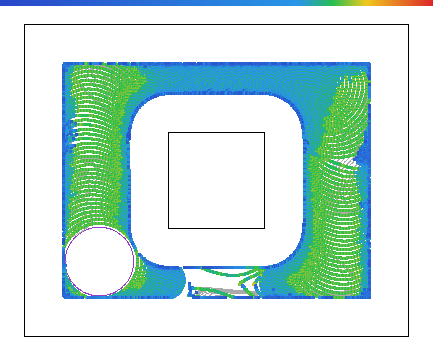
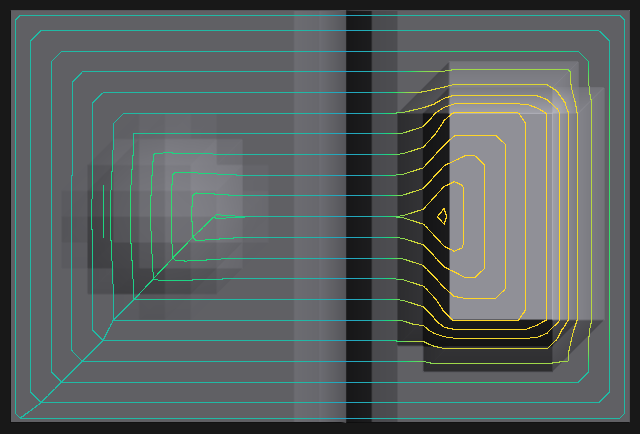
Two pictures RIP Engine drew of its own toolpaths. Nothing retouched.
Multi-side jobs
Op 1, flip, Op 2
RIP Engine looks at the part from all six sides and plans the fewest setups. The second setup starts from what the first one left, so it never cuts air.
FAQ
Questions
What is RIP Engine?
The engine behind Command Center's CNC tab. It runs on your shop PC and turns models into programs for your CNC machine. No cloud: the solid modelling, the toolpaths and the prices are all worked out on your own computer.
Which machines does it work with?
It has profiles for the Carvera and Carvera Air, desktop and full-size routers, and ShopBot, and writes programs for Carvera, GRBL, Mach and LinuxCNC, and ShopBot controls. Sending and starting a program from the PC is for the Carvera.
Does it start my machine on its own?
No. Loading a job never starts it. Starting a program from the PC needs you at the machine, and you confirm that on the screen first. STOP always works.
What does it cost?
RIP Engine is part of Command Center, which is free. Engines open for accounts one at a time while they're in testing.